Fix 413 Request Too Large in Nginx (Nodejs Uploads)
Saving blog drafts worked locally but failed in production with a vague “unable to reach the server” error. The actual issue was a 413 Request Entity Too Large response from Nginx, which blocked the request before it reached the Node.js app. Increasing Nginx’s body size limit resolved the issue.
2 likes
Quick Summary
Saving blog drafts worked locally but failed in production with a vague “unable to reach the server” error. The actual issue was a 413 Request Entity Too Large response from Nginx, which blocked the request before it reached the Node.js app. Increasing Nginx’s body size limit resolved the issue. This helps anyone handling large multipart requests (HTML + images) behind Nginx.
The Problem
-
Saving a blog draft failed only in production.
-
Frontend showed: “unable to reach the server.”
-
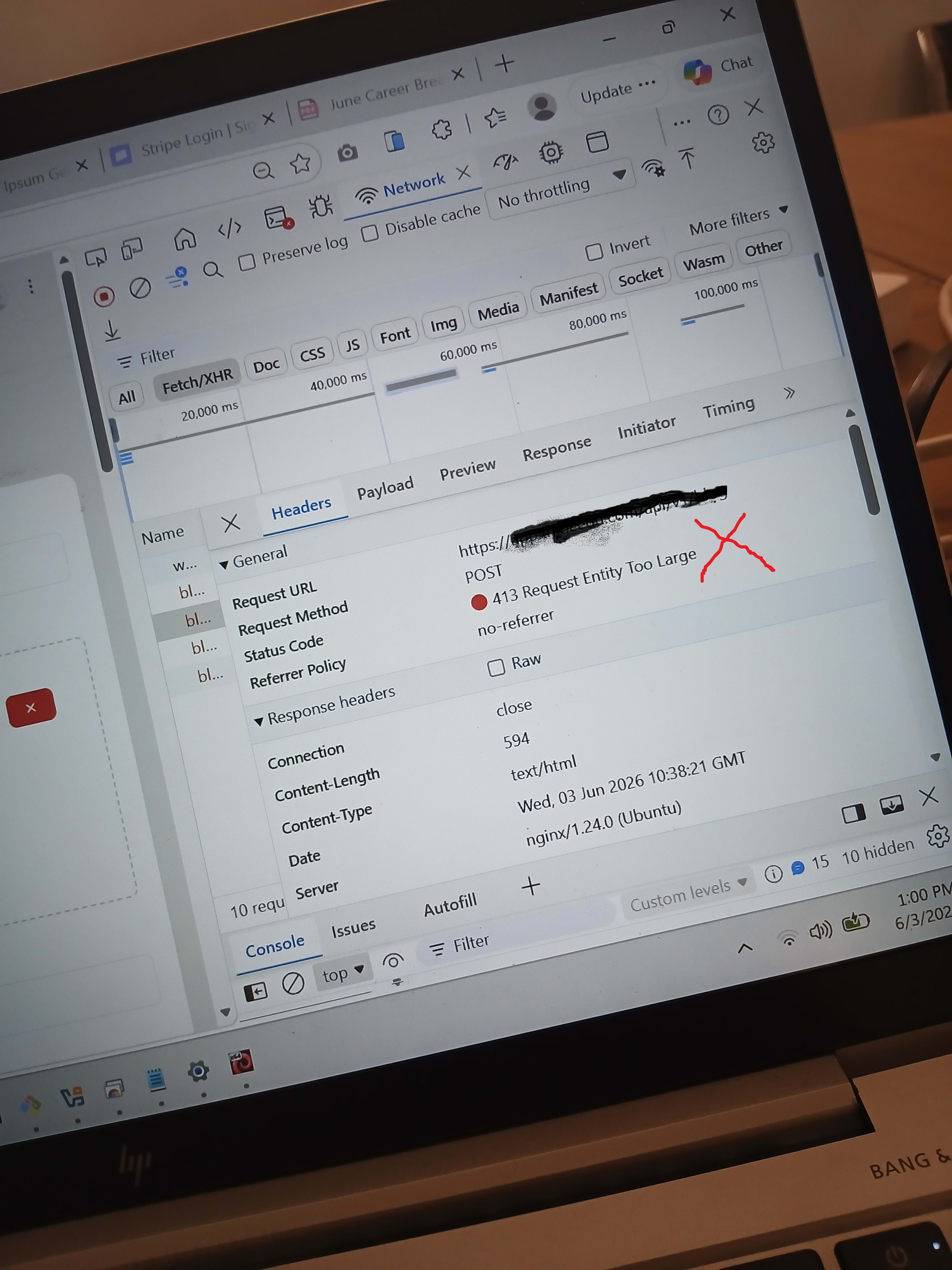
Network tab revealed:
-
Method: POST
-
Status: 413 Request Entity Too Large
-
-
Locally, everything worked as expected.
Root Cause
Nginx rejected the request due to its default body size limit (~1MB).
The blog payload included:
-
Large HTML content (contentHtml)
-
Optional cover image (up to 5MB)
-
Additional fields
Although the backend (Express + multer) allowed large payloads (up to ~32MB for fields and 5MB for files), the request never reached it. Nginx blocked it first.
The error appeared misleading because:
-
The frontend couldn’t read the Nginx response body due to cross-origin restrictions.
-
It defaulted to a generic network error message.
Investigation
Initial assumptions focused on backend limits (multer, Express body size).
Checks performed:
-
Verified multer config allowed large uploads.
-
Confirmed no issue locally (direct Express access).
-
Compared request paths:
-
Local - direct to Node
-
Production - through Nginx
-
Key clue:
- Status code 413 in DevTools - indicates request size issue before application logic.
Conclusion:
- The bottleneck was Nginx, not the application.
Solution
Increase the allowed request body size in the Nginx config for the API server.
Update the server block:
server {
    server_name xxxxxxxxxx.com;

    client_max_body_size 50M; # size bumped up from 1M

    location / {
        proxy_pass http://127.0.0.1:3000;
        proxy_set_header Host $host;
        proxy_set_header X-Real-IP $remote_addr;
        proxy_set_header X-Forwarded-For $proxy_add_x_forwarded_for;
        proxy_set_header X-Forwarded-Proto $scheme;

        proxy_buffering off;
    }
}
Then reload Nginx:
sudo nginx -t
sudo systemctl reload nginx
Reasoning:
-
50MB comfortably supports HTML content + image uploads.
-
Aligns with existing backend limits.
Trade-off:
- Larger limits increase risk of heavy payload abuse; choose a size appropriate to your use case.
Key Takeaways
-
A 413 error usually means a proxy (like Nginx), not your app, is rejecting the request.
-
Local success doesn’t guarantee production success when a reverse proxy is involved.
-
Default Nginx client_max_body_size is ~1MB and often too small for modern apps.
-
Misleading frontend errors can result from blocked responses in cross-origin requests.
-
Always check DevTools Network tab for real status codes.
-
Backend upload limits (e.g., multer) are irrelevant if the request never reaches the server.
-
Avoid embedding base64 images in HTML; use uploaded image URLs instead.
Found this useful? Pass it on.